


Litmatch—Make new friends
3.91.83K Reviews
App Specs
- Version
- 7.72.1
- Updated On
- License
- Free
- Downloads
- 100,000,000+
- Developer
- CONSTRUCT TECHNOLOGY
- Categories
- Social
- Platform
- Android, iOS
Screenshots
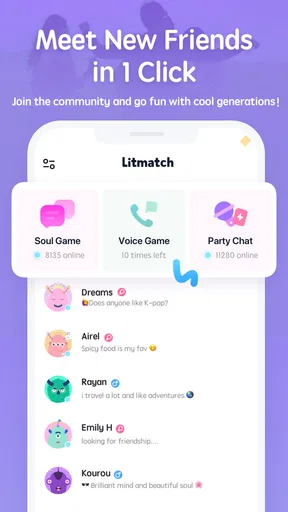
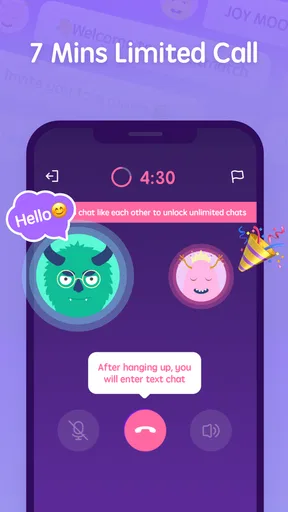
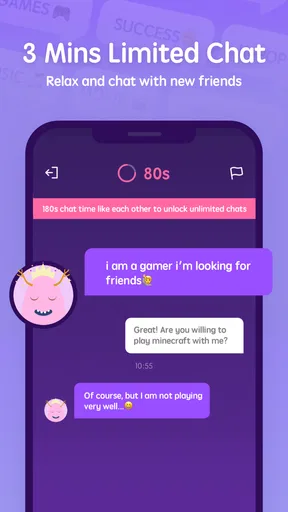
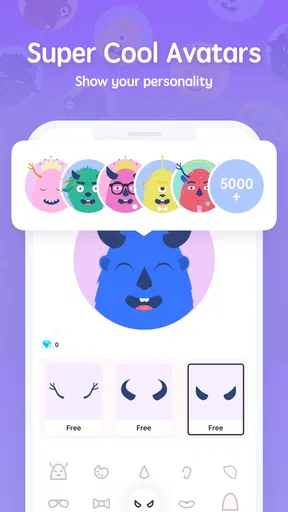

 Analysis by AppCompare
I tested Litmatch—Make new friends as a social app with one question in mind: does it work well when people in the same household use phones, tablets, or shared internet connections for very different social routines? My answer is mixed but useful. It can be a lively place to meet people through casual conversations and community activity, yet it needs clear personal boundaries because it is not designed as a family coordination tool.
Litmatch is free to install, developed by CONSTRUCT TECHNOLOGY, and aimed at mature users aged 17 and above. Its large audience—over 100 million installs—means you are unlikely to find an empty social space. At the same time, a 3.9 average from around 1.3 million ratings suggests a more uneven experience than the cheerful store summary might imply. I found that the app makes the most sense for someone who wants spontaneous online interaction, not for someone looking for a tightly managed household communication system.
How Litmatch Fits Into Shared Household Use
A realistic example is a shared home where one person uses a phone for work messages, another uses a tablet for social apps, and a teenager wants to chat with people outside school. Litmatch can serve the second and third activities, but it should remain tied to the individual user. I would not treat it like a common household account, a family noticeboard, or a replacement for a group messenger used to organize shopping, appointments, or emergencies.
The reason is simple: social discovery and household coordination have different goals. A family messenger keeps conversations connected to known people and practical tasks. Litmatch is built around meeting and talking with people beyond your existing circle. That difference affects privacy, expectations, and how easily another household member can understand what is happening inside the app.
On a shared device, I would give each person a separate device profile or, at minimum, make sure the previous user has signed out before handing the phone over. I would also avoid leaving personal conversations visible in notifications or recent-app previews. These are ordinary device habits rather than special Litmatch controls, but they matter more here because the app centers on personal exchanges with new contacts.
The most important household rule is to keep identity and access separate. A shared screen can be convenient, but a shared social account quickly becomes confusing. Messages, contacts, profile details, and conversations belong to one person. Mixing them makes it harder to know who is speaking and can expose private exchanges to the wrong user.
What the first setup should establish
Before using the app regularly, I would decide whose account it is, which device will normally hold it, and whether notifications should appear when other people are nearby. This is especially helpful in a home where phones are passed around. A person may be comfortable with social notifications in private but not on a family tablet sitting in a living room.
Worth Reading Before You Choose

Flipboard Shows What News Apps Must Do Beyond the Feed

Switching to Android Auto Means Rethinking Your Driving Routine

Google Calendar Makes a Crowded Week Easier to Manage

Ludo King Makes the Most of the Minutes Between Plans

Baby Panda World Brings Quick Play to Modern Phones, but Its Game Library Feels Busy

ESPN’s Live Game View Makes Following Close Games Easier
I would also set expectations about profile information. New-friend platforms encourage people to present themselves quickly, so it is tempting to share a real name, school, neighborhood, or daily routine to seem approachable. I would start with less identifying information and only become more open after a conversation has earned trust. This is a practical boundary for any social app, but it is particularly relevant when the central activity is meeting unfamiliar people.
The app is free, which lowers the barrier to trying it, but it includes in-app purchases ranging from a small amount to $254.99 per item. That wide range is a reason to discuss spending before the app is used on a shared device or a device connected to a family payment method. I would not assume that “free” means every interaction is cost-free. If a younger household member has access to the device, payment authentication should be handled at the operating-system level rather than left to guesswork.
Litmatch runs on Android 7.0 or later, so compatibility is relatively broad for older Android hardware. Its current version is 7.72.1, and keeping the installation current is sensible for stability and security. On a shared device, updates also reduce the chance that one person is using an outdated build while another expects the latest behavior, although an update does not turn the app into a family-managed service.
Coordinating without turning it into a family tool
Litmatch can fit into a household schedule if each user treats it as personal leisure. For example, someone might use it after dinner to have a short conversation, while another person uses the same Wi-Fi for work or study. The app does not need to control the household routine; the household needs a simple agreement about when social use is appropriate and when devices must remain available for shared tasks.
I found it useful to think in terms of “device ownership for the session.” If one person is chatting, that person should be the only one handling the account until the session ends. Passing the device midway through a conversation can lead to accidental replies, exposed messages, or an awkward change in tone. A quick lock or account switch is more reliable than expecting everyone to remember which screen was open.
For coordination between household members, I would still choose a familiar private messenger, a calendar, or direct calls. Those tools are better when the goal is to reach a known person quickly. Litmatch is more suitable when the goal is social exploration. Trying to use it for both purposes creates unnecessary friction because a new-contact environment is not organized around household responsibilities.
Another practical distinction is urgency. I would never rely on Litmatch for an emergency, a pickup arrangement, or a message that must be seen immediately by someone at home. A social conversation can be interrupted, missed, or misunderstood. A direct channel with the intended person is the safer choice for anything time-sensitive.
Age context changes the recommendation
The mature 17+ rating is not a minor label to ignore. In a household with children or younger teenagers, I would not install Litmatch for them simply because the app is popular or free. A large user base does not make every interaction suitable for every age. The app’s purpose—talking with new people—also means that age, honesty, and personal boundaries matter before a conversation even begins.
For an adult or an older teen who meets the age requirement, I would still recommend treating every new contact as unverified. A friendly profile is only an introduction, not proof of identity. I would avoid moving quickly to private contact details, sending personal images, or arranging an in-person meeting. If a conversation becomes pressuring, sexual, threatening, or financially focused, ending it is more important than preserving politeness.
Parents or guardians considering the app for an older teenager should have a direct conversation before installation. The useful topics are not only screen time but also what information stays private, what to do when someone asks for money, and when to show a concerning conversation to a trusted adult. Since the app is not a substitute for supervision or family rules, the quality of that conversation matters more than simply placing the icon on a device.
I also think the mature rating affects shared-device placement. A family tablet used by several people should not automatically contain every household member’s social apps. If the device is also used by a younger child, a separate profile or a different device is the cleaner arrangement. That keeps age-appropriate use from becoming an accidental matter of who taps the wrong icon.
Where the social experience works well
Litmatch’s strongest quality is immediacy. It is designed for people who want to move beyond passive scrolling and actually interact. If you are new to a city, spending a quiet evening alone, or simply interested in meeting people outside your existing contacts, the format can feel more inviting than a standard feed filled with polished posts.
I would recommend it most to users who enjoy short, low-pressure conversations and understand that not every exchange will become a lasting friendship. That mindset makes the app easier to enjoy. If you expect every match or conversation to be meaningful, the uneven quality of social interactions may become tiring.
The app also suits people who prefer social discovery over maintaining a carefully curated public profile. Traditional social networks often reward posting for an audience you already know. Litmatch feels more oriented toward the moment of meeting someone new. That can be refreshing, but it also means the user has to make more judgments about trust and conversational boundaries.
One non-obvious strength is that it can provide a structured first step for someone who finds ordinary social networking intimidating. Starting with a simple conversation can feel easier than publishing a post for friends, coworkers, or relatives to see. I would still advise keeping the first exchanges general, but the lower commitment can help a shy user practice social contact without immediately exposing a full personal network.
Where the experience becomes frustrating
The same openness that creates variety can also produce inconsistency. Some conversations may be engaging while others feel repetitive, shallow, or poorly matched to your interests. A user who wants dependable, topic-focused discussion may prefer a moderated interest community, a hobby forum, or a group chat with people they already know.
There is also a difference between discovering someone and trusting someone. Litmatch can help with the first step, but it cannot remove the work required for the second. If you are looking for professional networking, serious dating, local services, or verified expertise, I would choose a platform built specifically for that purpose. A general social app is not automatically the best tool just because it has many participants.
Another trade-off is attention. Quick conversations can turn into repeated checking, especially when the app is used during family time or alongside study. On a shared device, this can create tension because one person’s social session may compete with another person’s need to use the hardware. A household agreement about time and device priority is more effective than pretending the app will solve that conflict itself.
The purchase system deserves similar caution. Free access makes experimentation easy, while optional items can create pressure for users who want to enhance or extend their experience. I would use the app without treating purchases as necessary for social success. If the experience begins to feel like spending is required to keep up, I would pause and reassess rather than continuing automatically.
How it compares with familiar alternatives
Compared with a conventional social network, Litmatch feels less tied to an existing real-world identity. That is useful when you want to meet people outside your current circle, but it provides less built-in reassurance than talking to people you already know. A conventional network is usually better for family updates, known contacts, and long-term personal history.
Compared with a private messenger, Litmatch is better for discovery and worse for dependable coordination. A messenger is the obvious choice for telling someone at home that dinner is ready or confirming a ride. Litmatch is the more relevant option when the conversation itself is the activity and the other person is not already part of your contact list.
Compared with a moderated hobby community, it may feel faster and broader, but an interest-based service can deliver more focused conversations. If you want detailed advice about photography, games, cooking, or language learning, a dedicated community may give you better signal. Litmatch is more appealing when you want variety rather than a narrow subject.
Compared with a dating-specific service, it is not the platform I would choose for users who want clear relationship intentions. Its broader social purpose can be attractive, but it may also make expectations less obvious. Anyone seeking a particular type of connection should select a service whose audience and rules match that goal.
Practical habits that improve the experience
I would begin with a short trial rather than immediately building the app into a daily routine. Use a profile that reveals only what is necessary, keep early conversations on general topics, and notice how often you feel comfortable ending an exchange. If you cannot leave a conversation without pressure, that is a sign to step back.
For shared devices, finish each session deliberately. Close the app, lock the device, and check that notifications are not exposing message previews to the next user. If the device supports separate user profiles, use them. If it does not, a personal device is preferable for private social communication.
For spending, keep purchase authentication under the account holder’s control. I would never hand a child or guest an unlocked device with a saved payment method and assume the free label is enough protection. The listed purchase range reaches $254.99 for an individual item, so this is a genuine household budgeting issue rather than a theoretical concern.
For trust, use a slow escalation rule: general conversation first, personal details later, and no offline meeting without careful verification and a trusted person’s awareness. This approach does not make online contact risk-free, but it reduces the chance that enthusiasm will outrun judgment.
For coordination, separate social time from household messages. Keep appointments, chores, transport, and urgent contact in tools intended for known people. That simple division prevents Litmatch from becoming a confusing shared inbox.
My household verdict
After using it as a social discovery app, I see Litmatch as a reasonable choice for an adult or age-appropriate older teen who wants casual conversations with new people and is comfortable managing uncertainty. Its free entry, broad Android support, and large community make it easy to try. The developer is CONSTRUCT TECHNOLOGY, and the app has been available since March 29, 2019, so it is not a brand-new experiment.
Still, I would not recommend it as a family app, a shared account, or a household coordination channel. The 17+ rating should guide who uses it, and the open-ended nature of meeting strangers calls for more care than a typical family messenger. On a shared device, separate profiles, notification awareness, spending boundaries, and clear account ownership are essential.
My final view is favorable with conditions. Choose Litmatch for personal social exploration, not for managing the people and responsibilities you already know. If you want spontaneous conversation and can protect your privacy, it may be enjoyable. If you need verified identities, focused communities, reliable family communication, or strong age separation, another category of app will serve you better.
Pros
- Quick matching makes it easy to meet people with similar interests.
- Voice and text chat options support different communication styles.
- Virtual activities help conversations feel more engaging than plain messaging.
- Profiles are simple to create and can be customized with personal details.
- The interface is colorful
- intuitive
- and easy for new users to navigate.
Cons
- Some features and virtual gifts require in-app purchases.
- Anonymous interactions may increase the risk of fake or misleading profiles.
- Push notifications can become frequent and distracting.
- Matching quality may vary depending on your location and active users.
- Privacy settings require careful review before sharing personal information.
FAQs for Litmatch—Make new friends
What is Litmatch—Make new friends, and how does it work?
Litmatch is a social networking app designed to help people meet and chat with new friends online. After creating a profile, you can use features such as one-to-one messaging, voice conversations, interest-based interactions, and community-style activities to connect with other users. The experience is focused more on casual friendship and conversation than on traditional dating.
Is Litmatch—Make new friends free to download and use?
Litmatch can generally be downloaded for free on supported Android and iOS devices, and many of its basic social features are available without payment. However, the app may include optional in-app purchases, virtual items, premium functions, or limits that can be removed by spending money. Before purchasing anything, check the current pricing, subscription terms, and renewal conditions in your app store.
Is Litmatch safe for teenagers and younger users?
Litmatch includes social communication with people you may not know personally, so users should consider age requirements and privacy risks before joining. Safety can depend on the person you interact with, the information you share, and how quickly you report suspicious behavior. Avoid revealing your address, school, passwords, financial details, or private photos, and use blocking and reporting tools when necessary.
Can I control who contacts me on Litmatch?
The app provides social and privacy controls that may help you manage interactions, including blocking or reporting accounts and adjusting certain profile or communication settings. Still, available options can change with app updates, account type, or location. It is a good idea to review the privacy settings immediately after registration and stop communicating with anyone who pressures you, requests money, or behaves inappropriately.
What kind of information does Litmatch collect?
Like most social apps, Litmatch may request information needed to create and operate an account, such as a profile name, age details, device information, usage data, and content you choose to upload or send. Permissions can vary depending on the features you use. Read the current privacy policy before signing up, limit unnecessary permissions, and remember that anything shared publicly or in chats may be copied by others.


